DNB CRL
This site provides access to the Certificate Authority (CA) certificates and Certificate Revocation List (CRL) for DNB's Public Key Infrastructure (PKI). The CRL is a list of certificates that have been revoked by the CA before their scheduled expiration date. It is important for users and applications to check the CRL to ensure that they are not trusting revoked certificates, which may have been compromised or are no longer valid.
PKI Overview
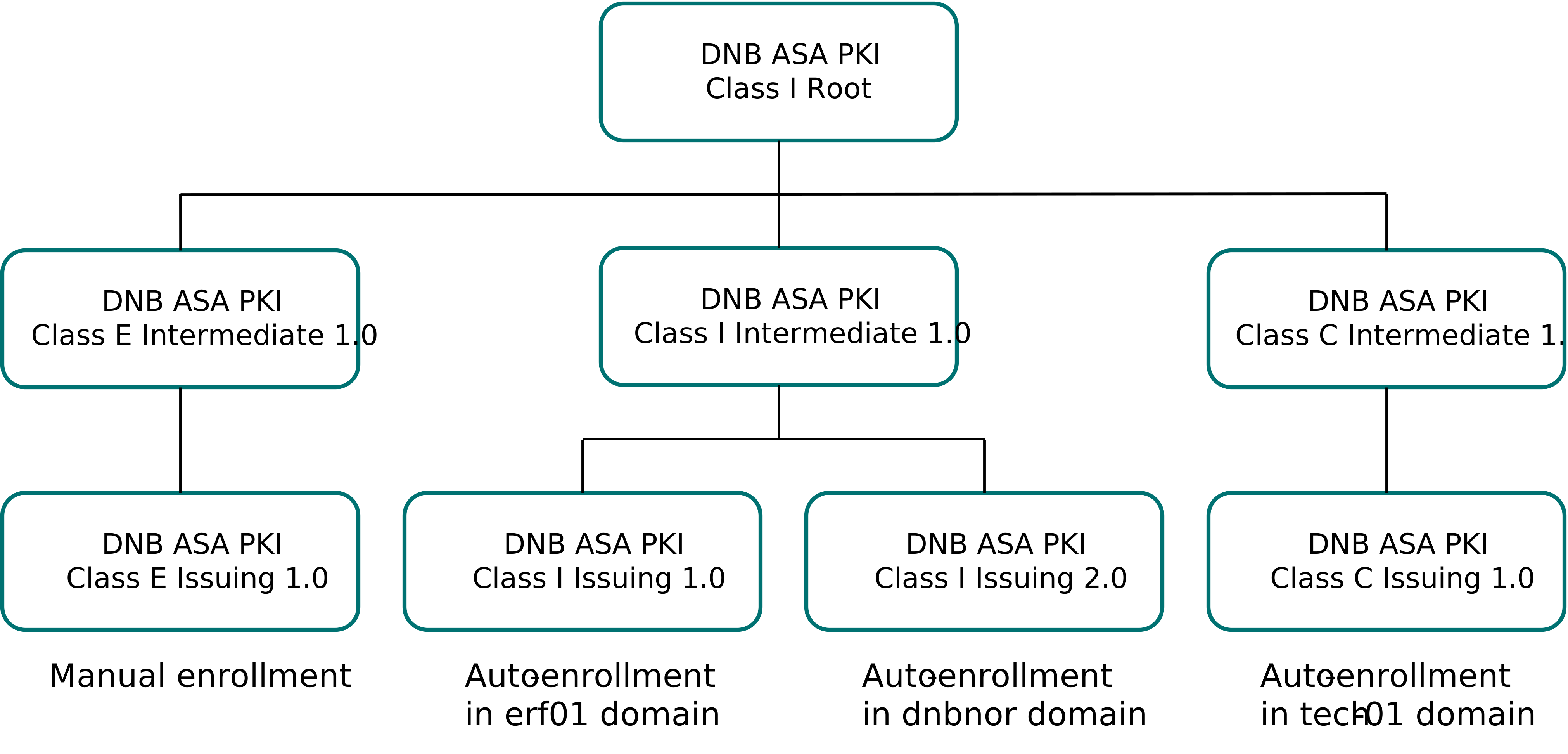
CA Overview
| CA | Description |
|---|---|
| Class E Issuing 1.0 | Used for manually issued certificates, such as those issued by Cyberark Machine Identity Security (formely Venafi). |
| Class I Issuing 1.0 | Used for auto-enrollment in erf01 domain. |
| Class I Issuing 2.0 | Used for auto-enrollment in dnbnor domain. |
| Class C Issuing 1.0 | Used for auto-enrollment in tech-01 domain. |
Complete Bundles
These files contain the complete certificate chains for each CA.
Individual Certificates
Latest versions of each individual CA certificate.
- DNB ASA PKI Class C Intermediate 1.0.crt
- DNB ASA PKI Class C Issuing 1.0.crt
- DNB ASA PKI Class E Intermediate 1.0.crt
- DNB ASA PKI Class E Issuing 1.0.crt
- DNB ASA PKI Class I Intermediate 1.0.crt
- DNB ASA PKI Class I Intermediate 3.0.crt
- DNB ASA PKI Class I Issuing 1.0.crt
- DNB ASA PKI Class I Issuing 2.0.crt
- DNB ASA PKI Class I Issuing 3.0.crt
- DNB ASA PKI Class I Root.crt
Machine Readable Format
Certificate metadata and download URLs for every bundle and individual certificate are published as JSON at dnb-pki.json. The file is regenerated whenever the certificates change, so it can be polled to automate trust-store updates.
Top-level fields
| Field | Description |
|---|---|
| schema_version | Version of this JSON layout; check before parsing. |
| generated_at | UTC ISO 8601 timestamp generated at the time the file was created. |
| content_hash | SHA-256 over the certificate data only (excludes generated_at). If unchanged since your last fetch, nothing has changed. |
| bundles | Complete certificate bundles (multiple certificates per file). |
| individual_certificates | Single-certificate files. |
Per-bundle / per-certificate fields
| Field | Description |
|---|---|
| file_name | Stable identifier; use it to match an entry across fetches. |
| download_url | Download URL for the file. |
| encoding | PEM or DER. |
| bundle_sha256 | SHA-256 of the bundle file. |
| sha256_fingerprint | SHA-256 fingerprint of an individual certificate; identifies exactly which certificate changed. |
| not_after / not_after_min | Expiry date / earliest expiry within a bundle. |
Recommended workflow
- Fetch dnb-pki.json.
- Compare content_hash with the value stored from your last fetch. If equal, no changes have occurred.
- If it changed, find which entry differs by comparing bundle_sha256 / sha256_fingerprint, matched on file_name.
- Download the changed file from its download_url.